
ClickUp Review 2026: Free Plan, Pricing and Who It Fits Best
We may earn a commission when you buy through our links. It doesn't affect our picks. How we make money
Quick answer
ClickUp is worth it for teams that want tasks, docs, multiple views and automations in one flexible tool, and it has a free plan with unlimited members. You can start on ClickUp's Free Forever plan with no credit card, then move to paid plans from $7 per user/month billed yearly. If your team only needs simple boards, Trello or Asana will feel lighter.
- ClickUp's Free Forever plan costs $0 with unlimited tasks and unlimited members, but only 60MB of storage, 5 Spaces and 100 automation runs (clickup.com/pricing, checked Oct 2026).
- Paid plans start at $7 per user/month billed yearly ($10 monthly) for Unlimited and $12 yearly ($19 monthly) for Business.
- No paid-plan trial is advertised. ClickUp's help center describes a 30-day money-back guarantee for new customers, with exclusions.
- Capterra reviews (page dated Sep 29, 2026) show recurring complaints about a steep learning curve, a cluttered setup and a laggy mobile app.
Our picks
Our pick for flexible all-in-one teams
ClickUp
Best for: Small teams, agencies and freelancers who want tasks, docs and automations in one place on a free plan with unlimited members
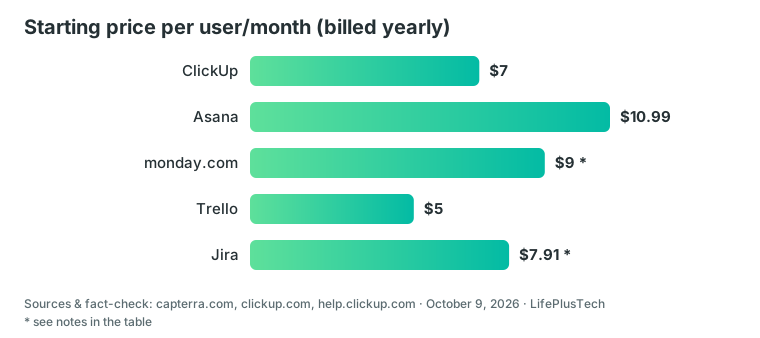
ClickUp combines task lists, Kanban boards, Docs, Calendar view and, on paid plans, Gantt charts, time tracking and Chat. On yearly billing only, its entry paid plan is $7 per user versus Asana's $10.99 and monday.com's $9; monday.com's monthly prices are unverified. The price you pay is a longer setup and a busier interface.
Pros
- Free Forever plan with unlimited tasks and unlimited members
- Unlimited plan at $7 per user/month billed yearly
- Built-in importers for Trello, Asana, monday.com, Jira, Notion and CSV
- Mobile apps on every plan, including Free
Cons
- Steep learning curve and cluttered feel during setup, per Capterra reviews
- Free plan has only 60MB storage and 1 day of activity history
- Mobile app and large boards reported as slow in dated reviews
- Upgrading applies to the whole Workspace, not selected members
Price: Free $0; Unlimited from $7 per user/month billed yearly ($10 monthly); Business from $12 yearly ($19 monthly). Checked Oct 2026, confirm at checkout.
Best alternative for visual, board-first teams
monday.com
Best for: Teams of three or more that prefer a polished board-style tool and don't mind paying per seat
monday.com is one of the closest mainstream rivals to ClickUp on features. It is pricier per seat on yearly billing and its free plan is capped at 2 seats, so it suits teams that value a guided, visual setup over a generous free tier.
Pros
- Free plan with 200+ templates and iOS/Android apps
- No credit card needed to sign up; FAQ mentions a 14-day Pro trial
- Paid plans from $9 per seat/month billed yearly
Cons
- Paid plans start from 3 users
- Free plan limited to 2 seats, 3 boards and 3 Docs
- Gantt, Calendar, guests and automations reportedly start above Basic, per a third-party pricing breakdown; verify on monday.com
Price: Free for up to 2 seats; Basic from $9 per seat/month billed yearly, Standard $12, Pro $19. Monthly prices not confirmed; checked Oct 2026.
Comparison at a glance
| Tool | Best for | Free plan | Starting price per user/month (billed yearly) | Main trade-off |
|---|---|---|---|---|
| ClickUp | Flexible all-in-one work management | Unlimited members, 60MB storage | $7 | Learning curve, busy interface |
| Asana | Polished, easier-to-learn task tracking | 2 users | $10.99 | Timeline/Gantt needs a paid plan |
| monday.com | Visual boards for teams of 3+ | 2 seats, 3 boards | $9 (3-seat minimum) | Free plan tiny, paid minimum seats |
| Trello | Simple Kanban boards | 10 collaborators, 10 boards | $5 | Fewer advanced views on lower plans |
| Jira | Software and agile teams | Up to 10 users, 2GB storage | $7.91 (appears to be monthly list price; varies by team size) | Built for software teams, community-only support on Free |
What is ClickUp and who is it for?
ClickUp is a cloud project management platform. It suits small to mid-size teams, agencies and freelancers who are tired of splitting work across chat threads, spreadsheets and email, because it puts tasks, docs, whiteboards, chat and automations in one workspace.
A realistic good fit: a five-person marketing agency that wants client boards, a shared docs area and a Gantt chart without paying for three separate tools. A poor fit: one person with a short personal to-do list.
This review rests on ClickUp's public pricing and help pages plus dated third-party reviews. It is not based on our own hands-on testing.
Why is ClickUp good?
The free plan is the headline. According to ClickUp's pricing page, Free Forever includes unlimited tasks, unlimited members, Docs, Kanban boards, Sprint Management, Calendar view, two-factor login and 24/7 support. Asana and monday.com cap free plans at 2 seats; Trello and Jira at 10 users.
The entry paid price is also low. On yearly billing, Unlimited costs $7 per user/month, against $10.99 for Asana Starter and $9 for monday.com Basic. Trello Standard is cheaper at $5, but it is a simpler tool.
What Unlimited adds is the real work-management layer:
- Unlimited storage, Spaces and Folders
- Gantt charts, custom fields and integrations
- Native time tracking, Goals and guests with permissions
- ClickUp Chat and Email in ClickUp
Switching is realistic. ClickUp's import documentation lists built-in importers for Asana, Trello, monday.com, Jira, Notion, Todoist, Wrike and more, plus CSV. Limits vary by plan. The mobile app for iOS and Android works on every plan, including Free.
User ratings are strong. G2 showed 4.6/5 from 14,804 reviews and Capterra 4.6/5 from 4,635 reviews, when those pages were last updated in late September and early October 2026. These are the platforms' scores, not ours.
What are the downsides of ClickUp?
A recurring complaint is complexity. Capterra reviews from 2026 describe a steep learning curve and an overwhelming or cluttered interface during setup. Capterra's own Ease of Use average is 4.3, and Get Alfred's review calls Asana more polished with a lower learning curve.
Performance comes up too. Reviewers mention a slow or lagging mobile app, a sluggish interface on large boards, slow search in deeply nested tasks, bugs after big updates and too many notifications. Workflow Picks says performance isn't always perfectly smooth.
The free plan has real limits, so read them before you build a whole system on it:
- 60MB of storage in total
- 5 Spaces, 3 Whiteboards and 1 day of activity history
- 5 active automation rules and 100 automation runs (the pricing table does not state the period; check clickup.com/pricing)
- Guests must get full access, with no permission controls
- Gantt, Custom Fields, Dashboards and Time Tracking are limited-use "Trial" features, not a trial of a paid plan
Also note that upgrading applies to your entire Workspace, so every member is billed.
How much does ClickUp cost in USD?
These are the prices on ClickUp's pricing page, checked in October 2026, per user per month:
- Free Forever: $0
- Unlimited: $7 billed yearly, $10 billed monthly
- Business: $12 billed yearly, $19 billed monthly. Adds unlimited dashboards and Timeline views, 5,000 automation runs per month, Mind Maps, private Whiteboards and Google SSO
- Enterprise: price on request, with SAML SSO, audit log and 250,000 automation runs per month
The page says "save up to 30% with yearly". Business is actually about 37% cheaper yearly, so go by the dollar figures.
For a five-person team, that means:
- Unlimited: $420 per year billed yearly, or $600 billed monthly
- Business: $720 per year billed yearly, or $1,140 billed monthly
ClickUp AI is extra: Brain AI is listed at $9 per user/month and Everything AI at $28. We could not confirm whether those are monthly or yearly rates, so check before you add it. For comparison on yearly billing, five seats on Trello Standard cost $300, monday.com Basic $540 (confirm five seats are sold), Asana Starter $659.40, and Jira Free $0.
No paid-plan trial is advertised, and Capterra lists none. The help center describes a 30-day refund for new customers' first paid subscription. The terms exclude purchases through a sales rep or reseller, renewals, expansions and accounts that finished a trial before buying. Confirm prices at checkout.
What are the best ClickUp alternatives?
Choose by the job you need done. The table above has the numbers; here is the decision logic.
- Asana if your team wants the easier tool and can live with a 2-user free plan. Starter is $10.99 per user/month billed yearly, and Timeline/Gantt sits behind a paid plan. Check asana.com for current trial terms.
- monday.com if you have three or more people and prefer a guided, visual setup. monday.com's free plan covers 2 seats, and paid plans need at least 3 users. On yearly billing it costs more per seat than ClickUp's Unlimited plan.
- Trello if all you need is Kanban boards. Standard is $5 per user/month billed yearly, and the free plan covers up to 10 collaborators.
- Jira if you run a software or agile team. Jira Free is $0 for up to 10 users but gives 2GB of storage and community-only support. Paid Standard is about $7.91 per user/month; check for your team size.
If you mainly want notes and wikis rather than task tracking, read our Notion review.
Is ClickUp worth trying now?
For most small teams, yes, because the downside is small. Free Forever needs no credit card, per ClickUp's FAQ, and you can set up a free workspace and pull in existing tasks from Trello, Asana or a CSV file.
Start with one project, not your whole company. Use the free plan to judge whether the interface feels manageable, since that is where reviewers say ClickUp wins or loses people. If you hit the 60MB storage or 100-run automation limits, Unlimited at $7 per user/month billed yearly is the logical step.
If your team already works fine from one board or a shared checklist, ClickUp is probably overkill; Trello or Asana's free plan will be quicker to set up.
FAQ
Is ClickUp really free?
Yes. Free Forever costs $0 with unlimited tasks and unlimited members, and no credit card is needed to sign up. It is capped at 60MB of storage, 5 Spaces, 3 Whiteboards and 100 automation runs, per clickup.com/pricing, checked October 2026.
Is ClickUp good for beginners?
It can be, but expect a learning curve. Capterra reviews from 2026 describe the setup as overwhelming, and Get Alfred rates Asana as easier. Starting from a template and one small project helps new users avoid the clutter.
ClickUp vs Asana: which is easier?
Based on review sources, Asana is the easier, more polished tool. ClickUp offers more flexibility, unlimited free members and a lower entry price: $7 versus Asana Starter at $10.99 per user/month billed yearly. Asana's free plan covers only 2 users.
Can I import from Trello or Asana?
Yes. ClickUp's help center lists built-in importers for Trello, Asana, monday.com, Jira, Notion, Todoist and others, plus a CSV importer. The documentation notes that feature availability and limits vary by plan, so test with a small project first.
Does ClickUp offer a free trial of paid plans?
No paid-plan trial is advertised; Capterra lists none either. Use the free plan to evaluate. ClickUp's help center describes a 30-day refund for new customers' first paid subscription, with exclusions such as reseller purchases, renewals and expansions.
Sources & fact-check
How this guide was made: we compared official pricing, documentation and independent reviews (sources below). We have not tested the products ourselves unless stated. Prices change — confirm before you buy.
Facts checked: October 9, 2026 · 30 ✓
- ClickUp Pricing
- ClickUp FAQs
- ClickUp Help Center: Intro to pricing
- ClickUp Help Center: Import to ClickUp
- ClickUp Terms
- ClickUp Pricing 2026 (Capterra)
- ClickUp Reviews 2026 (Capterra)
- ClickUp Reviews 2026 (G2)
- Is ClickUp Worth It? Honest Review (2026) – Get Alfred
- ClickUp Review 2026 – Workflow Picks
- monday.com Pricing
- monday.com Pricing Breakdown 2026 (PMWorld360)
- Asana Pricing
- Trello Pricing
- Jira Pricing (Atlassian)
- Jira Pricing Plans (resolution.de)