Notion Pricing in 2026: Free, Plus, Business and AI Costs in USD
We may earn a commission when you buy through our links. It doesn't affect our picks. How we make money

Quick answer
Notion costs $0 on Free, $10 per member per month on Plus and $20 on Business when billed yearly (Notion's pricing page, checked October 17, 2026). Solo users and small teams that don't need Notion Agent or SSO should stay on Free or Plus, and Business is the upgrade for teams that want built-in AI, private teamspaces and 90-day history. Our Notion links may earn us a commission, which doesn't change the recommendations below.
- On yearly billing, Notion lists Free at $0, Plus at $10 and Business at $20 per member per month; Enterprise is custom-priced (official pricing page, checked 2026-10-17).
- Independent guides put monthly billing at $12 for Plus and $24 for Business. By our calculation, yearly billing then saves about 17% per seat, while Notion's banner says "up to 20%".
- Notion Agent and AI Meeting Notes are included in Business and Enterprise seat prices. Free and Plus get only a limited trial, and the pricing page lists no separate AI add-on.
- Custom Agents are free to try, then cost $10 per 1,000 monthly Notion credits on top of seat prices.
- The standard trial is 30 days of Business, but only for teams on a professional email domain. Gmail-style and school addresses don't qualify.
- The startup program gives 1 to 6 months of Business free. The 3- and 6-month offers are meant for startups building scalable, tech-related products or services, while service businesses and SMBs get 1 month.
- Students and educators can get Plus free for one member with a school email.
Our picks
Plan guide pick
Notion (Plus and Business plans)
Best for: Solo users and small teams that want one workspace for notes, docs and wikis, and startups that may qualify for free Business months
Free covers one person well, Plus suits a small team that outgrows the free block limit, and Business is the step for Notion Agent, SSO and private teamspaces. Business costs twice as much as Plus, so upgrade only when you need a Business-only feature.
Pros
- Free plan with unlimited pages and blocks for one person
- Guests are free and don't count as paid seats
- 30-day Business trial for eligible teams
- Startup program can cover 1 to 6 months of Business
Cons
- Business costs twice as much as Plus
- Removed seats aren't refunded mid-cycle
- Card payments only
- Custom Agents are billed on top of seat prices
Price: From $10 (Plus) or $20 (Business) per member per month billed yearly, checked October 2026. Confirm tax and any monthly pricing at checkout.
Comparison at a glance
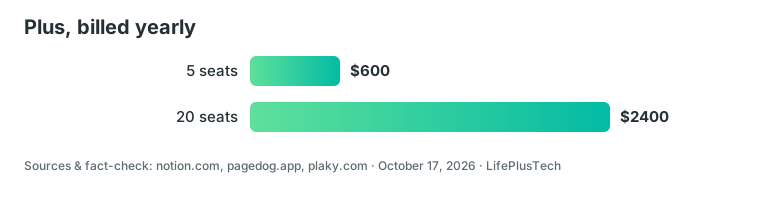
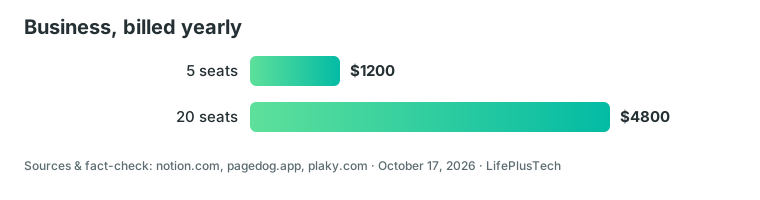
| Team size | Plus, billed yearly | Business, billed yearly | Business premium per year |
|---|---|---|---|
| 5 seats | $600 | $1,200 | $600 |
| 20 seats | $2,400 | $4,800 | $2,400 |
How much does Notion cost in 2026?
Notion is free to start, but anything beyond personal use is a per-seat subscription. These are the list prices on Notion's official pricing page, checked on October 17, 2026, in the US dollar view and before sales tax:
- Free: $0, aimed at individuals organizing personal projects.
- Plus: $10 per member per month, for small teams and professionals.
- Business: $20 per member per month, the plan Notion marks as recommended.
- Enterprise: custom price, you contact sales.
The $10 and $20 figures are yearly-billing prices. Notion's page has a Pay monthly / Pay yearly toggle and says you can save up to 20% with yearly billing. Independent guides such as Rock and PageDog put monthly billing at $12 for Plus and $24 for Business. By our calculation from those figures, that is about 17% saved per seat on yearly billing.
You pay per member. Guests are free but only see the pages they're invited to. Adding someone mid-cycle creates a prorated charge, while removing someone gives no credit, and seats are recounted at renewal. Payment is by credit or debit card only.
A custom domain is an extra on every plan: $8 per month per domain billed yearly, or $10 billed monthly. If you just want to see the app first, you can open a free Notion workspace and upgrade later.
What do you get on the Notion Free plan, and when is it not enough?
Free works well for one person. Pages and blocks are unlimited when you're the only member, so notes, tasks and a personal wiki cost nothing.
The limits show up with a team. Once a workspace has 2 or more members, the free plan caps the number of blocks. Notion doesn't publish the exact figure on its pricing page. When you hit the cap, you can still read, edit and organize existing blocks, but you can't add new ones.
The other Free limits, from the official comparison table:
- File uploads: 5 MB per file (paid plans have no cap beyond roughly 5 GB per file)
- Page history: 7 days
- External guests: 10
- Charts: 1
- Automations: buttons only, with no custom database automations
A two-person freelance studio sharing a client wiki will likely hit the block cap first. A solo user storing large PDFs will hit the 5 MB upload limit first. Either is a fair reason to move to Plus.
Notion Plus vs Business: which plan fits your team?
Plus removes the everyday limits: unlimited blocks, guests and charts, 30-day page history and custom database automations. Business adds what matters once several people, clients or security rules are involved.
Beyond Plus, Business includes:
- Notion Agent and AI Meeting Notes
- SAML SSO and domain verification
- private teamspaces and granular database permissions
- verified pages
- premium connections such as GitHub and Asana
- 90-day page history (Plus has 30)
Enterprise goes further with SCIM user provisioning, advanced security controls, an audit log, zero data retention with AI model providers (other plans have 30-day retention) and a customer success manager.
The table below shows yearly cost on yearly billing, excluding sales tax, custom domains and Custom Agent credits. Across 5 seats, Business costs $600 more per year than Plus. Across 20 seats, the gap is $2,400. The real question is whether private teamspaces, SSO or built-in AI are worth that to your team.
Our rule of thumb:
- Solo user: stay on Free until you need larger uploads or longer history, then Plus.
- Small team of 2 to 10 sharing a wiki and projects: Plus, unless you need AI for everyone or restricted spaces.
- Startup with investors, contractors or sensitive data: Business, ideally with the free months below.
How much does Notion AI cost?
On the pricing page, Notion AI is not a separate subscription. Business and Enterprise include it in the seat price, and no AI add-on is listed for any plan.
Free and Plus get only a limited trial of Notion Agent (chat, generate, autofill, translate), meeting notes and Research mode. If you want AI as a daily tool for the whole team, that's what the jump from $10 to $20 per seat buys.
The extra cost is Custom Agents. Notion says they are free to try, then $10 per 1,000 monthly Notion credits, and they need credits on Business and Enterprise. Workers, a beta feature for custom code, also use credits. One third-party site quotes $13 per 1,000 credits, which is not on Notion's page, so we use the official $10 figure.
On privacy, Notion's FAQ says it won't train its models on your data unless you opt in, and that its AI providers are contractually barred from training on customer data.
Can you try Notion Business free?
There are two routes, and they are not the same thing.
The standard 30-day trial
According to Notion's paid plan trials page, eligible teams get 30 days of Business with all its features, including Notion AI, SAML SSO and private teamspaces. You need a professional email domain and no existing Business or Enterprise plan. Personal or educational domains such as Gmail don't qualify, and you must start the trial from the web or desktop app. The page mentions no Plus trial.
If you entered card details, Business renews automatically at the end, even when you started the trial from Plus. To cancel the trial, go to Settings → Explore plans before the 30 days run out. You then drop to Free, or straight back to Plus if you started from Plus.
The startup program
Notion for Startups offers 1 to 6 months of Business free, including Notion AI, for new, non-paying customers. The 3- and 6-month offers are intended for startups building scalable, tech-related products or services. Service businesses and SMBs get 1 month. The length depends on who you are:
- Partner-affiliated startups with a code from their partner: 6 months
- Non-partner startups: 3 months on a new Business plan
- Small and medium businesses (including service businesses), teams under 10 employees, or applicants Notion can't fully verify: 1 month
The 6-month offer lists a valid Notion domain, a public company website, a company email address and fewer than 100 employees. It only applies to net new Business plans. Notion decides eligibility and says it will reach out within 2 to 5 business days if you're a good fit. So treat "up to 3 months" as a best case for a non-partner tech startup, not a promise. A team under 10 people may get just 1 month.
If you qualify, you can apply through our Notion startup link.
Cancelling, refunds and student access
Plans renew automatically until you cancel. For a paid plan, the pricing-page FAQ points to Settings → Billing → Change plan on desktop (the Settings → Explore plans path above is for trials). Paid features stay until the end of the billing cycle, and the downgrade takes effect then.
Refunds are limited. You get a full, not prorated, refund if you downgrade within 3 days of signing up for monthly billing, or within 30 days for annual billing. Seats added by mistake can be refunded pro rata if you ask within 3 days of the invoice. If a payment fails, Notion retries up to 8 times over a month, then limits the workspace and moves it to Free.
Students and educators get Plus free, limited to 1 member. Sign up with a school email and access starts right away. Thousands of school domains qualify, not only .edu. Compared with Free you get more guests, longer history and bigger uploads, but school domains can't use the Business trial.
Which Notion plan should you choose?
Start with the cheapest plan that removes the limit you actually hit.
- Just you, notes and personal projects: Free. Students and educators should take the free Plus instead.
- You need big uploads, 30-day history or automations: Plus at $10 per seat on yearly billing.
- A team that wants Notion Agent, SSO or private teamspaces: Business at $20 per seat, ideally after the 30-day trial or the startup program.
- Large organization with audit and provisioning needs: talk to Notion sales about Enterprise.
For more on the app itself, see our Notion overview. If your real need is tracking tasks and sprints rather than docs and wikis, ClickUp, a project-management tool, is a different kind of product with its own pricing model.
FAQ
Is Notion a paid app or is it free?
Both. Notion has a free plan with unlimited pages and blocks for one person. Paid plans start at $10 per member per month on yearly billing for Plus and $20 for Business, according to Notion's pricing page checked October 17, 2026.
What is the difference between Notion Plus and Business?
Business adds Notion Agent, AI Meeting Notes, SAML SSO, private teamspaces, granular database permissions, verified pages and 90-day page history. Plus has 30-day history and only a limited AI trial. Business costs $20 per seat on yearly billing, twice Plus.
Does Notion AI cost extra?
Not as a separate add-on. Business and Enterprise include Notion AI in the seat price, while Free and Plus get a limited trial. Custom Agents are free to try, then $10 per 1,000 monthly Notion credits.
How long is the Notion free trial and who is eligible?
The Business trial lasts 30 days. Teams using a professional email domain without an existing Business or Enterprise plan qualify. Personal or educational domains such as Gmail don't, and you must start it from the web or desktop app.
Who can apply for Notion Business free months?
New, non-paying customers can apply for 1 to 6 months of Business. The 3- and 6-month offers target startups building scalable, tech-related products or services. Service businesses, SMBs and teams under 10 employees may get 1 month. Notion decides eligibility.
Is Notion free for students and educators?
Yes. Students and educators get the Plus plan free, limited to one member, by signing up with a school email. Thousands of school domains qualify, not just .edu. School domains can't use the Business trial.
Sources & fact-check
How this guide was made: we compared official pricing, documentation and independent reviews (sources below). We have not tested the products ourselves unless stated. Prices change — confirm before you buy.
Facts checked: October 17, 2026 · 16 ✓